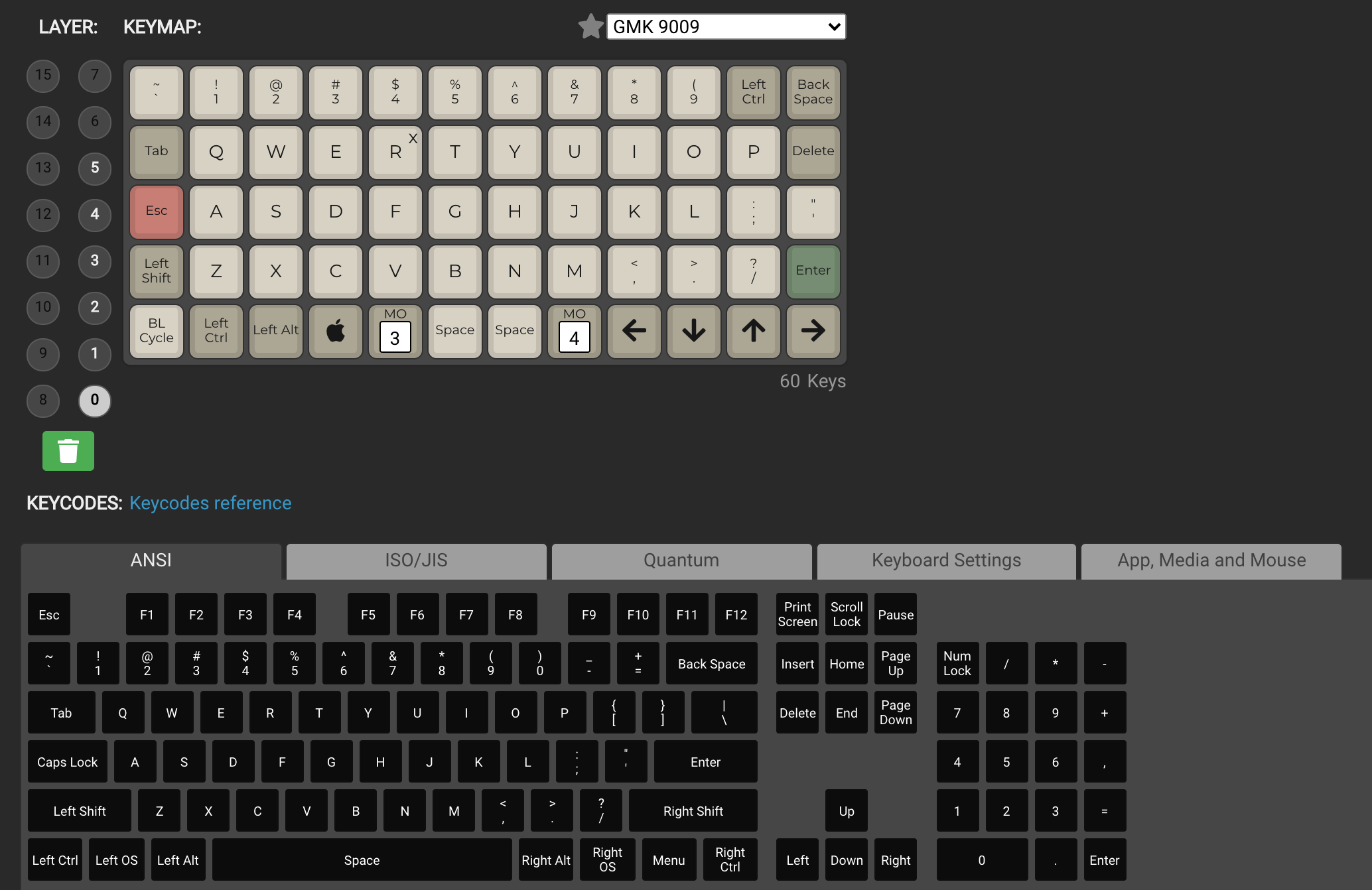
If you are buying your first ortholinear keyboard, one of the first questions you will run into is this: should I use QMK or VIA?
TL;DR: QMK vs VIA at a Glance
| Feature | VIA | QMK |
|---|---|---|
| Learning curve | Low — visual remapper in a browser | Higher — firmware files, flashing |
| Live key remapping | ✅ Instant | ❌ Requires recompile + flash |
| Layers | ✅ Up to 4 by default | ✅ Unlimited (config-dependent) |
| Macros | ✅ Basic, visual | ✅ Full QMK macros |
| Combos / tap dance / mod-tap | ⚠️ Limited | ✅ Full support |
| Encoders & lighting | ✅ Basic VIA support | ✅ Full programmability |
| Hardware requirement | Board must ship with VIA-compatible firmware | Any QMK-supported board |
| Best for | Beginners, fast iteration, switching layouts often | Power users, custom behaviors, long-term builds |
The 30-second version: if your keyboard supports VIA, start there. Move to QMK when you hit a wall on what VIA can express. If your board only supports QMK, just use QMK — it's not as scary as the docs make it look.
The longer answer is that VIA is the easy front door while QMK is the workshop behind it. If your board supports VIA, you can often make useful changes in minutes. If you want custom behaviors, more advanced layers, combos, tap dances, or deeper firmware control, QMK is still the standard.
What QMK does well
QMK Firmware is the open-source firmware platform behind a huge number of mechanical and ortholinear keyboards. It is what makes boards like the Planck and Preonic so flexible in the first place.
Why people stick with QMK:
- You get full control over layers, macros, combos, tap-hold behavior, encoders, lighting, and other advanced features.
- It is widely documented and supported across enthusiast keyboards.
- It scales with you. You can start simple, then keep refining your layout as your typing habits change.
The tradeoff is that QMK asks more from you. Even when you use the QMK Configurator, you are still dealing with firmware files, flashing, and a workflow that feels more technical than a simple settings panel.
What VIA does well
VIA is the option most beginners end up loving first. On supported keyboards, it gives you a visual way to remap keys without rebuilding firmware every time you want to change something.
Why VIA is so appealing:
- It is much faster for testing layout ideas.
- It makes layer changes feel approachable instead of intimidating.
- It is perfect for people who are still figuring out where they want numbers, arrows, symbols, and navigation keys on a 40% board.
The catch is that VIA is not universal. A board needs proper VIA support. Even when it does, VIA usually covers the common workflow, not every advanced behavior a heavy QMK user may want later.
QMK vs VIA for ortholinear beginners
For most first-time ortho buyers, VIA is the better starting point if your keyboard supports it.
That is especially true on 40% keyboards, where the learning curve is not really about typing on a grid. The real adjustment is learning layers. You will probably move arrows once, then move them again. You will try one number layer, hate it, and rebuild it. You may decide Enter belongs on a thumb key after a week. VIA makes those iterations painless.
If you are still shopping, that means VIA support should be a buying factor, not an afterthought. A board that is easy to rework will feel much more beginner-friendly during the first month.
When QMK is the better choice
Go straight to QMK if any of this sounds like you:
- You already know you want custom mod-taps, combos, or tap dance behaviors.
- You enjoy tweaking firmware and treating your keyboard like a long-term project.
- You want the broadest possible control instead of the easiest possible interface.
- You are buying a board specifically because it has strong QMK support and documentation.
For that kind of user, VIA can feel like a convenient layer on top, but not the final destination.
The best setup for most Try Ortho Keys readers
For this site and its audience, the practical recommendation is:
- Buy an ortholinear keyboard with solid QMK support.
- Prefer a board with VIA support if you are new to layers.
- Use VIA to find a layout that feels natural.
- Move to QMK when you know exactly what you want the board to do.
That path gives you the easiest on-ramp without boxing you into a simplified setup later.
If you already own a Planck or Preonic, our configuration guide is still the best place to start with flashing and layout basics. If you are still deciding what to buy, browse our ortholinear keyboard list and focus on boards that clearly mention QMK and VIA support.
Common mistakes people make
1. Treating firmware as a minor detail
On a full-size keyboard, software support matters. On a 40% ortholinear board, it matters even more. Your layout depends on layers, and layers depend on good firmware support.
2. Choosing a board before checking remapping workflow
Do not assume every keyboard is equally easy to customize. Two boards can look similar on a product page and feel completely different once you actually start changing layers.
3. Overbuilding your first layout
A good first ortho layout should be boring. Keep the alphabet familiar. Put arrows somewhere easy to remember. Build one reliable symbol layer and one reliable navigation layer. Fancy ideas can come later.
A simple first layer strategy for 40% boards
If you are new, start here:
- Base layer: keep your alpha layout familiar.
- Nav layer: arrows, Home, End, Page Up, Page Down.
- Number layer: numbers and common symbols in one predictable place.
- Function layer: media, brightness, reset, and anything you use less often.
This is another reason VIA is so useful early on. You can test these ideas quickly and learn what actually fits your hands.
Final verdict
If you are a beginner, VIA is usually the best first experience.
If you care about maximum control, QMK is still the better long-term platform.
The smartest move is not choosing one forever. It is choosing a keyboard that gives you both: the convenience of VIA now, and the depth of QMK when you are ready for it.
That combination is what makes a modern ortholinear keyboard feel fun instead of frustrating.